PyCatSim User API
PyCatSim, like a lot of other Python packages, follows an object-oriented design. It sounds fancy, but it really is quite simple. What this means for you is that we’ve gone through the trouble of coding up a lot of methods that apply in various situations - so you don’t have to worry about that. These situations are described in classes, the beauty of which is called “inheritance” (see link above). Basically, it allows to define methods that will automatically apply to your use case, as long as you put your data within one of those classes. A major advantage of object-oriented design is that you, the user, can harness the power of PyCatSim in very few lines of code through the user API without ever having to get your hands dirty with our code (unless you want to, of course). The flipside is that any user would do well to understand PyCatSim classes, what they are intended for, and what methods they support.
The following describes the various classes that undergird the PyCatsim edifice.
Cat (pyCatSim.Cat)
- class pyCatSim.api.cat.Cat(name, age=None, color=None, mood=0, hunger_level=0, energy=0, health=0)[source]
Represents a virtual cat with attributes like name, age, color, mood, hunger, energy, and health.
- Parameters:
name (str) – The name of the cat.
age (int, optional) – The age of the cat in years. Default is None.
color (str, optional) – Coat color of the cat. Acceptable values are: ‘tabby’, ‘black’, ‘orange’, ‘tortoiseshell’, and ‘tuxedo’. Fuzzy matching is used to interpret close inputs. Default is None.
mood (int, optional) – Mood level on a scale from -10 (grumpy) to 10 (ecstatic). Default is 0.
hunger_level (int, optional) – Hunger level of the cat. Higher values indicate greater hunger. Default is 0.
energy (int, optional) – Energy level of the cat. Default is 0.
health (int, optional) – Health level of the cat. Default is 0.
- name
The name of the cat.
- Type:
str
- age
The age of the cat.
- Type:
int or None
- color
The interpreted or validated color of the cat.
- Type:
str or None
- mood
The cat’s mood.
- Type:
int
- hunger_level
The cat’s hunger level.
- Type:
int
- energy
The cat’s energy level.
- Type:
int
- health
The cat’s health level.
- Type:
int
Examples
import pyCatSim as cats
nutmeg = cats.Cat(name='Nutmeg', age = 3, color = 'tortoiseshell')
Color 'tortoiseshell' interpreted as 'tortoiseshell'.
Methods
bathe()Bathes the cat, decreasing mood and improving health.
eat()Feeds the cat by reducing its hunger level and improving its mood.
Gives a random fact about cats
groom()Grooms a cat, increasing its health and mood levels by one unit.
make_noise([noise, play])Have the cat make a noise
play([mood_boost, hunger_boost, energy_boost])Simulates playtime with the cat.
show()Shows a picture of the cat.
sleep([duration])Simulates the cat getting some sleep.
- bathe()[source]
Bathes the cat, decreasing mood and improving health.
Cats typically dislike baths, which lowers their mood by 1, but it improves their cleanliness and boosts health by 1.
Examples
import pyCatSim as cats
mochi = cats.Cat(name='Mochi', mood=3, health=5)
mochi.bathe()
print(mochi.mood)   # Output: 2
print(mochi.health) # Output: 6
2
6
- eat()[source]
Feeds the cat by reducing its hunger level and improving its mood.
When called: - Decreases hunger_level by 1 (to a minimum of 0). - Increases mood by 1.
- Returns:
A dictionary containing the updated hunger_level and mood.
- Return type:
dict
Examples
import pyCatSim as cats
nutmeg = cats.Cat(name='Nutmeg', hunger_level=2, mood=0)
nutmeg.eat()
# Output: {'hunger_level': 1, 'mood': 1}
{'hunger_level': 1, 'mood': 1}
- give_fact()[source]
Gives a random fact about cats
- Returns:
A fact randomly chosen from a pre-defined fact pool
- Return type:
str
Examples
import pyCatSim as cats
nutmeg = cats.Cat(name='Nutmeg', age = 3, color = 'tortoiseshell')
nutmeg.give_fact()
Color 'tortoiseshell' interpreted as 'tortoiseshell'.
'Cats have five toes on their front paws, but only four on the back.'
- groom()[source]
Grooms a cat, increasing its health and mood levels by one unit.
Examples
import pyCatSim as cats
nutmeg = cats.Cat(name = 'Nutmeg', age = 3, color = 'tortoiseshell')
nutmeg.groom()
Color 'tortoiseshell' interpreted as 'tortoiseshell'.
- make_noise(noise='meow', play=False)[source]
Have the cat make a noise
- Parameters:
noise (string, optional) – The sound the cat makes. Valid options include “meow”, “purr”, “chirrup”, and “hiss”. The default is ‘meow’.
play (bool, optional) – Whether to play the sound (True) or print out the sound (False). The default is False.
- Raises:
ValueError – Raises an error if the sound is not valid
- Returns:
The sound
- Return type:
str
See also
pyCatSim.utils.noises.meowSimulates a cat meow
pyCatSim.utils.noises.purrSimulates a cat purr
pyCatSim.utils.noises.chatterSimulates a cat chatter
pyCatSim.utils.noises.hissSimulates a cat hiss
pyCatSim.utils.noises.chirrupSimulates a cat chirrup
Examples
import pyCatSim as cats
nutmeg = cats.Cat(name='Nutmeg', age = 3, color = 'tortoiseshell')
nutmeg.make_noise()
Color 'tortoiseshell' interpreted as 'tortoiseshell'.
'Meow!'
import pyCatSim as cats
nutmeg = cats.Cat(name='Nutmeg', age = 3, color = 'tortoiseshell')
nutmeg.make_noise(noise='hiss')
Color 'tortoiseshell' interpreted as 'tortoiseshell'.
'Hiss..'
- play(mood_boost=1, hunger_boost=1, energy_boost=-1)[source]
Simulates playtime with the cat.
- Parameters:
mood_boost (int, optional) – How much mood improves from play. Must be an integer. Default is 1.
hunger_boost (int, optional) – How much hunger increases from play. Must be a positive integer. Default is 1.
energy_boost (int, optional) – How much energy decreases from play. Must be a negative integer. Default is -1.
- Raises:
TypeError – If any of the arguments are not integers.
ValueError – If hunger_boost is not positive or energy_boost is not negative.
Examples
import pyCatSim as cats
nutmeg = cats.Cat(name='Nutmeg', age = 3, color = 'tortoiseshell')
nutmeg.play()
Color 'tortoiseshell' interpreted as 'tortoiseshell'.
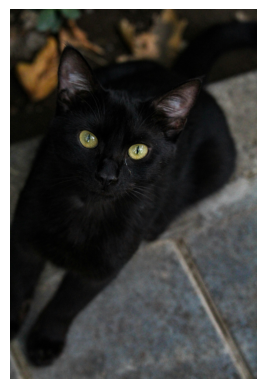
- show()[source]
Shows a picture of the cat. If the color is not set, shows a random cat.
- Return type:
None.
Examples
import pyCatSim as cats
mochi = cats.Cat(name='Mochi', color = 'black')
mochi.show()
Color 'black' interpreted as 'black'.
- sleep(duration=0)[source]
Simulates the cat getting some sleep.
Sleep() causes the cat to sleep for an optionally-specified duration (hrs; default=0). For every 3 hours the cat sleeps, its energy level increases increases by 1 (rounded down to the nearest integer). For example, having the cat sleeping for a duration of 5 hours raises its energy level by 1.
- Parameters:
duration (int or float, optional) – Number of hours the cat sleeps. Must be an integer or float. The default is 0.
- Raises:
TypeError – If duration is neither an integer nor float.
ValueError – If duration is not positive or is greater than 16.
Examples
..jupyter-execute:
import pyCatSim as cats
nutmeg = cats.Cat(name='Nutmeg', age = 3, color = 'tortoiseshell')
nutmeg.sleep(duration=5)
Clowder (pyCatSim.Clowder)
- class pyCatSim.api.clowder.Clowder(catlist=None)[source]
Represents a group of cats.
- Parameters:
catlist (list) – A list of cats from the Cat class
- catlist
A list of cats from the Cat class
- Type:
list
Examples
import pyCatSim as cats
nutmeg = cats.Cat('Nutmeg')
charming = cats.Cat('Charming')
maze = cats.Cat('Mazikeen')
una = cats.Cat('Una')
group = cats.Clowder(catlist = [nutmeg, charming, maze, una])
Methods
add_cat(cat)Adds a Cat to the Clowder
remove_cat(cat)Removes a Cat from the Clowder
- add_cat(cat)[source]
Adds a Cat to the Clowder
- Parameters:
cat (pycCatSim.Cat) – the new Cat to add
- Raises:
TypeError – If any of the arguments are not Cat instances.
Examples
import pyCatSim as cats
nutmeg = cats.Cat('Nutmeg')
charming = cats.Cat('Charming')
maze = cats.Cat('Mazikeen')
una = cats.Cat('Una')
group = cats.Clowder(catlist = [nutmeg, charming, maze, una])
bailey = cats.Cat('Bailey')
group.add_cat(bailey)
- remove_cat(cat)[source]
Removes a Cat from the Clowder
- Parameters:
cat (pyCatSim.Cat) – the Cat to remove
- Raises:
ValueError – If the Cat is not found in the clowder.
Examples
import pyCatSim as cats
nutmeg = cats.Cat('Nutmeg')
charming = cats.Cat('Charming')
maze = cats.Cat('Mazikeen')
una = cats.Cat('Una')
group = cats.Clowder(catlist = [nutmeg, charming, maze, una])
group.remove_cat(nutmeg)
Owner (pyCatSim.Owner)
- class pyCatSim.api.human.Owner(name, cats_owned)[source]
Represents a cat owner who can care for one or more cats
- Parameters:
- name
The name of the owner.
- Type:
str
- Raises:
TypeError – If cats_owned is neither a Cat nor a list of Cat objects.
Examples
from pyCatSim import Cat, Owner

cat1 = Cat(name="Whiskers")
cat2 = Cat(name="Boots", color="tabby")

# Single cat
owner1 = Owner(name="Sasha", cats_owned=cat1)

# Multiple cats
owner2 = Owner(name="Liam", cats_owned=[cat1, cat2])

print(owner1.name)
print([cat.name for cat in owner2.cats_owned])
Color 'tabby' interpreted as 'tabby'.
Sasha
['Whiskers', 'Boots']
Methods
adopt(cats)Add a Cat object or a list of Cat objects to an owner's cats.
feed(cat)Feed the specified cat owned by this Owner.
Gives a random fact about cats
groom(Cat)Simulates an owner grooming one cat, increasing its mood by one
- adopt(cats)[source]
Add a Cat object or a list of Cat objects to an owner’s cats.
- Parameters:
cats (pyCatSim.Cat or list) – the cat(s) to be added to the list
- Raises:
TypeError – If any of the arguments are not Cat.
ValueError – If cats_object is not Cat.
Examples
import pyCatSim as cats

cat1 = cats.Cat(name="Whiskers")
cat2 = cats.Cat(name="Boots", color="tabby")
owner1 = cats.Owner(name="Sasha", cats_owned=cat1)
owner2 = cats.Owner(name="Liam", cats_owned=[cat1, cat2])

chestnut = cats.Cat(name='Chestnut', age = 4, color = 'tabby')
nutmeg = cats.Cat(name='Nutmeg', age = 3, color = 'tortoiseshell')
owner1.adopt(nutmeg)
owner2.adopt([chestnut,nutmeg])

print([cat.name for cat in owner2.cats_owned])
Color 'tabby' interpreted as 'tabby'.
Color 'tabby' interpreted as 'tabby'.
Color 'tortoiseshell' interpreted as 'tortoiseshell'.
['Whiskers', 'Boots', 'Chestnut', 'Nutmeg']
- feed(cat)[source]
Feed the specified cat owned by this Owner. Decreases hunger_level by 1 and Increases mood by 1.
- Parameters:
cat (pyCatSim.Cat) – The cat to feed. Must be owned by this owner.
- Raises:
ValueError – If the specified cat is not owned by this owner.
AttributeError – If the cat does not have ‘hunger_level’ or ‘mood’ attributes.
..jupyter-execute:
import pyCatSim as cats
nutmeg = cats.Cat(name='Nutmeg', age = 3, color = 'tortoiseshell')
john = cats.Owner(name='John', cats_owned = nutmeg)
john.feed(nutmeg)
- give_fact()[source]
Gives a random fact about cats
- Returns:
A fact randomly chosen from a pre-defined fact pool
- Return type:
str
Examples
import pyCatSim as cats
nutmeg = cats.Cat(name='Nutmeg', age = 3, color = 'tortoiseshell')
nutmeg.give_fact()
Color 'tortoiseshell' interpreted as 'tortoiseshell'.
'Cats have five toes on their front paws, but only four on the back.'
- groom(Cat)[source]
Simulates an owner grooming one cat, increasing its mood by one
- Parameters:
Cat (pyCatSim.Cat) – a Cat object that you would like to groom.
- Return type:
None.
Examples
from pyCatSim import Cat, Owner
cat1 = Cat(name="Whiskers")
Deborah = Owner(name="Deborah", cats_owned=cat1)
Deborah.groom(cat1)